
Project - Daily Practice to be a better UX Writer
from DailyUXWriting.com
For 15 days, it was sent an e-mail with user experience challenges. If you hover down this page, you will find my solutions. The challenge is for the writing practice. For this exercise, I’ve created visual scenarios for a better understanding of the strategy.
Day 1 - Flight Cancellation Alert
Scenario: A traveler is in an airport waiting for the last leg of a flight home when their flight gets abruptly canceled due to bad weather.
Challenge: Write a message from the airline app notifying them of the cancellation and what they need to do next.
Characters: Headline 45, Body 175 max, Button(s) 25 max
My approach: This is a message with a negative approach unless there's a safety reason. I also wanted to offer a solution: a place on the next available plane.

Day 2 - Promotion for a Sports App
Scenario: A user is a working parent, and a big sports fan, in the midst of their favorite sports season who can no longer attend games.
Challenge: Write a promotional screen for an app that lets a user choose teams, sends game reminders, real-time score updates, and highlight videos.
Characters - Headline 40; Body 175; Button(s): 25
My approach: The app informs about several sports and the user is the one who will personalize that experience. Besides diversity, one app will solve time problems. The Call To Action is clear in case the user wants to keep exploring the information.
.png)
Day 3 - Grocery Delivery Pop-Up
Scenario: A user is in their favorite supermarket. They open the supermarket’s app on their phone to see what’s on sale and are greeted by a promotion.
Challenge: Write a promotional home screen for a subscription service that delivers groceries to the user once a month for a flat fee.
Characters: Headline 45 max, Body 175 max, Button(s) 25 max
My approach: I used humor since this is a task that rarely someone enjoys doing and because not everyone enjoys Pop-Ups.

Day 4 - Wrong Email Address Message
Scenario: The user entered the wrong email address to sign in to their account.
Challenge: Tell the user to enter the right email.
Characters: Body 40 max
My approach: To guess the password can be time-consuming. The message needs to be clear in the reason and offer a solution. The buttons offer two possibilities for this inconvenience.

Day 5 - Recovery Message
Scenario: The user works in graphic design. While critiquing a design in a mobile app, their phone abruptly turns off. When they restart the phone, they reopen the app.
Challenge: Write a message that the user will read immediately upon opening the app.
Characters: Headline 40 max, Body 140 max, Button(s) 20 max
My approach: The frustration of an error interrupting work can lead to a change of mind about a product. I offered different solutions for that reason and explained each step.

Day 6 - Danger Alert
Scenario: It’s Monday. A user has just gotten into their car to drive to work. They plug their phone into the car and start driving.
Challenge: How would you let the user know there’s a fire happening in a nearby town that is causing road closures? The effect on their commute is unknown, but there is a definite danger if the fire gets closer.
Characters: Headline 30 max, Body 45 max
My approach: Because the user is driving a car, the message needs to be clear and add an immediate solution.

Day 7 - Game Update from Sports App
Scenario: A sports fan is at a wedding while their favorite team is playing against their arch-rivals. Their team scores.
Challenge: How would you, quickly, let the sports fan know about the latest play, the current score, and the key players? Write it.
Characters: Headline 30 max, Body 45 max
My approach: The user wants to know: the current score, who did it, and what time it occurred. I also give the option to explore more about the play.

Day 8 - Concert Notification from Music App
Scenario: The user is a casual music fan and (on occasion) goes to live concerts. They have a music player app on their phone.
Challenge: Tell the user that one of their favorite bands is playing live in their town.
Characters: Headline 30 max, Body 45 max, Button 25
My approach: This notification has several reasons to be clicked: "Near you" (geography), "limited sits" (scarcity) in "buy now" (urgency).
.png)
Day 9 - Expired Credit Card
Scenario: The user is trying to rent a car using an application but the credit card on file has expired.
Challenge: Write them an error message so that they can correct the problem.
Characters: Headline 30, Body 45
My approach: The user is interested in buying this product. An error can end this trip to buy. My goal was to offer several options for the solution of payment and make it easier to solve each choice by coloring in red. A solution that makes this task quicker and easier.

Day 10 - Request for Personal Information
Scenario: The user is trying to view a website to help them buy a car. But the content can’t load without the user’s location. They need to enter their ZIP code and first name.
Challenge: Ask them where they live and whom they are without sounding like you're unnecessarily mining their data.
Characters: Headline 25, Body 45, Button 15
My approach: The goal is to say to the user why we need the information. By ‘personalizing’ the search, the user will have a better experience looking for a product: what exists nearby.

Day 11 - Title and Meta Description for SEO
Scenario: An elderly user is doing a Google search to find an easy way to buy contact lenses online.
Challenge: Write a title and meta description for a website that sells subscription contact lenses delivered to a user every 30 days—convince them to try it.
Characters: Title 60 max, Meta Description 160 max
My approach: Safety and urgency are concepts important for most elderly, especially when buying on the Internet. I also offer a reward for the ones interested in trying the product: no taxes.

Day 12 - Name Not Recognized
Scenario: A user is creating an account. When they come to the step where they are asked to enter their name, they get an error message. A fraud detection software thinks their name is fake—but it’s wrong 5% of the time.
Challenge: Write an error message that prompts them to fix the error without shaming them for having a fake-sounding name.
Characters: 45 max
My approach: I found it necessary to add a button as a solution for this case since this can be an error from the page. The name added by the user will be then.

Day 13 - Schedule Update
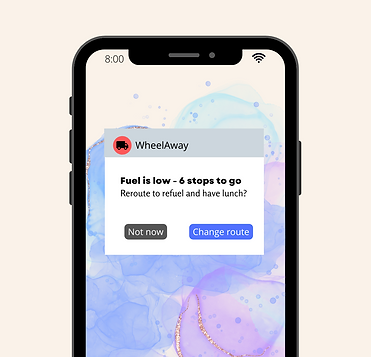
Scenario: A short-haul truck driver has a phone app that monitors his route, schedule, fuel & deliveries. He has 6 more deliveries before stopping for fuel and lunch. Due to unexpected traffic, he’s behind schedule. He can choose to stay on his planned route for a few more stops, but risk running low on fuel and missing lunch, or he can get fuel and lunch now and finish the deliveries later.
Challenge: Write a push notification alerting him of this dilemma and options.
Characters: Headline 30 max, Body 45 max, Button(s) 25 max
My approach: Because the user was driving, this challenge was difficult. The title needed to be small and informative. The same goes for the metadata description and buttons: clean and easy to read.
14 - Unknown Error Message
Scenario: A user is creating an account. When they come to the step where they are asked to enter their name, they get an error message. A fraud detection software thinks their name is fake—but it’s wrong 5% of the time.
Challenge: Write an error message that prompts them to fix the error without shaming them for having a fake-sounding name.
Characters: 45 max
My approach: The word “pending” gives hope that this error will pass. My goal was to acknowledge the mistake and add a solution.
.png)
15 - Onboarding Screens for Banking Bill Pay App
Scenario: Write a multi-screen onboarding experience for a banking app that automatically pays a user's bills every month—as long as they set it up correctly.
Characters Limit: For each screen: Headline (45), Body (100), Button (25)
My approach: For this challenge, I got inspired by an existing Bank that has a service in the app to make payments faster. The entire process needs to be easy to read for the user (it can be a reason to give up). Breaking this setup into four stages can keep the user interested (because it seems easy in the visuals). On the screen, I’ve added a reward at the end of the experience.
.png)